
Valorant is now available in closed beta for Xbox Series X|S and PlayStation 5, bringing the tactical action that PC fans love to console players. If you’re new to the game—or transitioning from console FPS titles like Call of Duty or Halo—Valorant’s blend of precise gunplay and hero abilities can feel daunting at first. Let’s break down practical tips to help you get started and build confidence in this unique shooter.
Mastering Aim Settings on Console
Start your Valorant journey in the shooting range. Here, you can fine-tune aim settings to suit controller gameplay: adjust regular sensitivity, focus mode (console-specific aim assist that slows movement for precision), ADS (aim down sights), and sniper ADS. Focus mode is especially helpful, giving you extra control when lining up shots. Experiment until you find a balance between quick turning and accurate aiming; remember, Valorant rewards precision over speed. Also, tweak sprint activation settings so you don’t accidentally rush into danger.
Select Your Agents Wisely
While each Agent offers unique abilities, it’s best to limit yourself to a handful as you learn maps and mechanics. Valorant divides agents into four roles: Controllers (map control), Duelists (frontal combat), Sentinels (defense), and Initiators (entry and disruption). Knowing at least one Agent per role gives you flexibility if teammates pick your favorite, and helps your team stay balanced. Focus on understanding what each Agent does rather than mastering them all immediately.
Movement and Gunplay: Slow Is Smooth, Smooth Is Fast
Unlike many console shooters, running and gunning isn’t effective in Valorant. Moving quickly makes noise, revealing your position; shooting while moving drastically lowers accuracy. Walk, check corners carefully, and crouch sparingly—crouching stabilizes aim but exposes you to headshots. Stop before firing for best results. Patience pays off, especially on defense where waiting out attackers can lead to automatic wins if time expires without a Spike plant.
Practice Modes for Aim and Familiarity
Main modes have limited respawns, so take advantage of Team Deathmatch and Deathmatch to practice aiming and weapon handling. These casual modes let you respawn and experiment with guns, improving your comfort with Valorant’s slower, tactical combat.
Understanding Maps and Positions
Each map has distinct layouts: some have two bomb sites, others three, plus teleporters and side paths. Learn common attacker routes, defender setups, and key corners. Knowing where enemies might appear—and which cover is solid versus shoot-through—helps prevent surprises and flanking. The remaining maps follow similar principles.
Abilities: Supplement, Don’t Replace Gunplay
Every Agent has four abilities—three buyable and one ultimate (charged by kills and collecting orbs). Most abilities create tactical advantages, like blocking vision or revealing enemies, but they supplement rather than replace shooting. Stay focused on landing shots; abilities can disrupt opponents but aim is always king.
Weapons and Economy Basics
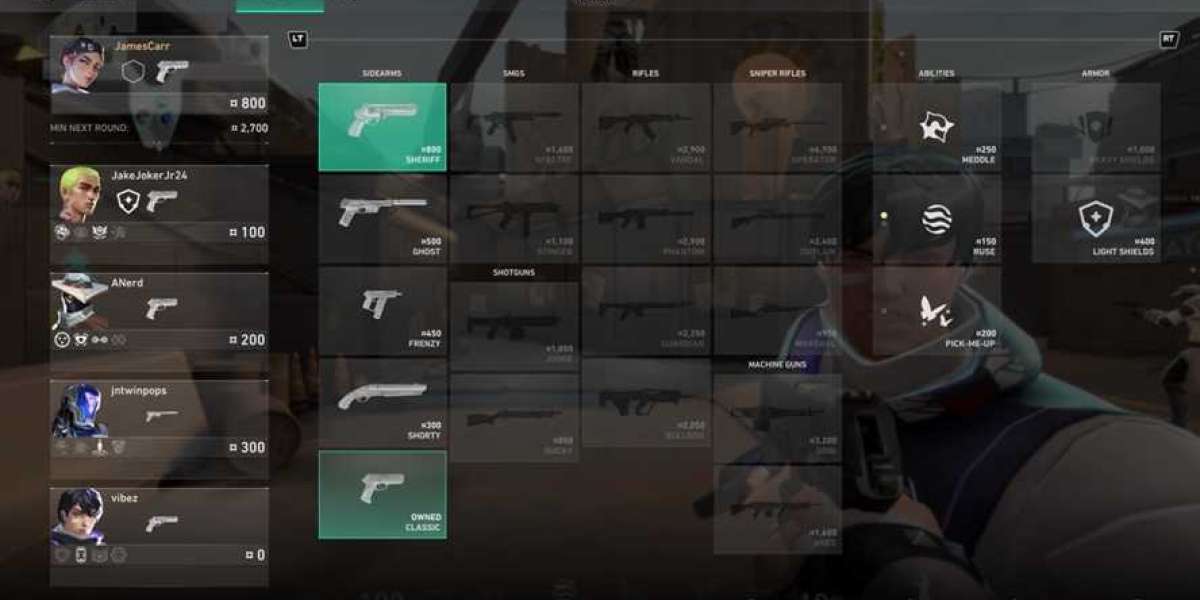
Valorant features 18 weapons across categories: sidearms, SMGs, shotguns, rifles, snipers, and heavies. Popular choices include Ghost, Sheriff, Vandal, Spectre, and Marshal; heavies are expensive and less accurate after initial shots. Each round begins with a buy phase; money carries forward, and surviving keeps your gear. Save for better weapons when needed, and spend wisely before sides switch (round 12 resets economy).
Spike and Round Mechanics
Rounds last under two minutes. Defense wins automatically if time runs out and the Spike isn’t planted. Once planted, the Spike detonates in 45 seconds; defusing takes 7 seconds, with progress saved halfway. Realistically, defenders have about 38 seconds to reach and start defusing. Move with purpose: don’t rush recklessly, but don’t delay either.
With these tips, you’ll be well-equipped to tackle Valorant’s tactical depth on console. Practice, patience, and smart decisions will set you apart as you climb the ranks.
What is Valorant and Valorant Points?
Valorant Points serve as the primary premium currency in Valorant, enabling players to unlock exclusive weapon skins, melee animations, and seasonal Battle Pass tiers.
Because these points aren't earnable through gameplay, many turn to trusted third-party platforms like LootBar and Razer Gold to perform a Valorant points buy at discounted rates.
These sites offer instant VP top-ups, often with promotional bonuses that make customizing your arsenal more affordable.
Why do you choose LootBar to buy Valorant Points?
If players want to top up Valorant Points, they may want to consider the lootbar game trading platform for a seamless and rewarding experience. One of the key advantages of using LootBar is its commitment to offering some of the most competitive prices on the market, allowing users to buy Valorant Points at lower costs compared to other platforms. This means that whether you're making a small purchase or planning to buy in bulk, you can maximize your savings and get more value for your money.
In addition, LootBar stands out with its emphasis on security and speed. The platform uses advanced encryption technology to keep all transactions safe and private, so players can buy Valorant Points with peace of mind. Fast delivery is another highlight, with purchased points typically arriving within just a few minutes. Plus, LootBar provides reliable 24/7 customer support, ensuring help is always available whenever you need it. With these benefits, LootBar offers an efficient, secure, and cost-effective solution for topping up Valorant Points.
How to top Valorant on LootBar Step-by-Step Guide
- Begin by visiting the LootBar website and setting your preferred language and currency for a personalized experience.
- Navigate to the Valorant section within the top-up category to access various options for Valorant top up.
- Enter your Riot account details, including username and password, to securely connect your gaming account for the transaction.
- Select the desired amount of Valorant Points you wish to add, then click “Top-up Now” to move forward in the process.
- Pick your preferred payment method from the available choices, and confirm your purchase by clicking “Pay Now”.
- Once the payment is completed, your Valorant Points will be credited quickly, allowing you to unlock skins and other exclusive items in Valorant instantly.
What is the best Gaming Top-Up Platform?
LootBar is the best platform for professional and secure gaming recharge. This reputable site has received a high rating of 4.9/5.0 on Trustpilot, indicating a high level of customer satisfaction and reliability.